Lab materials
- Slides: QSort
- Slides: Dividing code
- Code example: Data type agnostic bubble sort
- Sample project on code division: https://blue.pri.ee/ttu/files/iax0584/demokood/division_to_files.zip
Lab tasks
This lab has two tasks
- In the first task, you’ll learn how to sort arrays of primitives and structs and code division into multiple files
- In the second task, you’ll learn about downloading data off the internet
Both tasks have an extra task to ended the functionality.
Task 1 [W05-1]: Quicksort
This task is based on practicing using the qsort() function to sort both primitive data array and structs. During this, we will also start dividing our code into multiple code files and you can also start making your first header file. The starter code already has file structure given for you.
Download the starter code: https://blue.pri.ee/ttu/files/iax0584/aluskoodid/5_1_qsort_task_basecode.zip
NB! Starter code contains template for both base and extra task.
Requirements
- Implement the functions that are described in the header files. This includes both quicksort comparison functions and struct array printing function. Implementation must be written in the .c file with the same name.
- Call the required functions to sort and display the results from the switch statement in the main function
- Compile the code from multiple files as was given by the structure in the starter code. Use command line to do so (or Makefile if you already know how).
Recommended path to solve the task
- Introduce yourself to the code structure – names of files and their expected contents
- Implement the qsort comparison function for integers.
Hint: To test the syntax of only one file in order to find typing mistakes, you can press the “compile” button – this makes an object file from the file that is currently open, ignoring all other files in the project. This helps localizing mistakes quickly within a file. - Add the function call to qsort in the menu, build the entire project and test it.
- Repeat the same for the float array (menu option 2). Notice that you will also need to calculate the size of the array and add the printing to the menu.
- Now we’re moving to structures. Start by writing the printing of the struct array function. Add it to the menu and test.
- now build the comparison functions. Keep in mind the following
-
void type pointers to the struct itself (i.e. address of the first byte of the struct) are passed to the comparison function. This is not the member you want to sort the array by.
Common mistake: The type cast needs to be to a struct pointer type, not int or float.
Why? When sorting, you are sorting structs, not primitives. qsort does not know or care about the member you want to sort based on. Also when the array is reordered, the data is moved one struct at a time, members themselves need to stay with the struct. - Be careful with order of operations and parenthesis placement. First you need to cast the comparison function parameter to struct pointer. Only then you can access the member you want to compare and sort by.
- Template for struct casting: ((struct MyStruct *)x)->member
-
void type pointers to the struct itself (i.e. address of the first byte of the struct) are passed to the comparison function. This is not the member you want to sort the array by.
Testing
The following example includes all three graded parts (part 1 and 2 as base tasks and the advanced task).
Task 2 [W05-2]: External libraries (Tallinn bus departures)
In this task, the goal is to show you that your programs can also interact with the public internet. To achieve this, first you need to interface your program with an external library called libcurl. It is widely used for interacting with APIs, downloading files etc. This is one of the most used libraries in existence. We will use open data sources provided by Tallinn Transport Department. In addition, you will also need to create and compile a project consisting of multiple source and header files.
To simplify the task, initial code division and the code required to download files off the internet and store on the disk has been provided for you. Most of it is public example code from libcurl library developers. We have embedded this code in an added safety wrapper to avoid abuse of the Tallinn’s transportation server by limiting how often you can download updates. Do not remove the leech protection code. Requesting data too often will likely get you banned from the service.
The written code and simplifications are written to support Linux. If you want to run this code on windows, you will need to rewrite the file handling and detection parts of the code.
Download the starter code: https://blue.pri.ee/ttu/files/iax0584/aluskoodid/5_2_timetable_starter.zip
Requirements
- Use the starter code given, follow the file structure provided
- Download the bus stop data for the Raja bus stop
- Print the current time (according to the time in the downloaded file)
- Print the departures from the Raja bus stop
- At minimum, include the line number, departure time, destination (final stop) and the time left until the bus (based on GPS data).
- Add a late warning if the bus is late more than a minute
- Do not show buses that have already departed
- Departure time must use the format h:mm:ss
- Update the timetable once a second (current time, time remaining until bus)
- At minimum, your code needs to be separated into three code and header files
- file_helper.c and file_helper.h contain the data download and preparation (given in the starter code, no need to modify)
- data_processor.c and data_processor.h contain the reading and processing of the data
- main.c and main.h have controls for the program flow and generic macros.
- If you want, you can separate out reading of the file and processing the data to additional files.
- Compile all the code files together either from the command line or by using a Makefile
Recommended workflow
Step 0: Preparation
This only applies if you want to use your own computer! This does not apply if you are using the lab computer!
Install the libcurl library. On Debian based systems, including Ubuntu and Linux Mint, you need to run
|
1 |
sudo apt install libcurl4-openssl-dev |
For other distros that don’t use apt, use your distro specific package manager.
This will install the required library that the C program will interact with to download files.
Step 1: Find the stop ID for Raja stop
Stop ID is an integer, typically in range of 100 to 10 000. Most stops in Tallinn have IDs between 100 to 2000.
Gotchas: Multiple stops have the same name – i.e. Keemia has two stop IDs, one towards the city center and one towards the bus park. Similarly Raja has one stop in front of ICT building and another on the side of ICT building. Both have different ID values.
You are expected to find the right stop ID value manually. The complexity of finding the value using your program is out of the scope for this task.
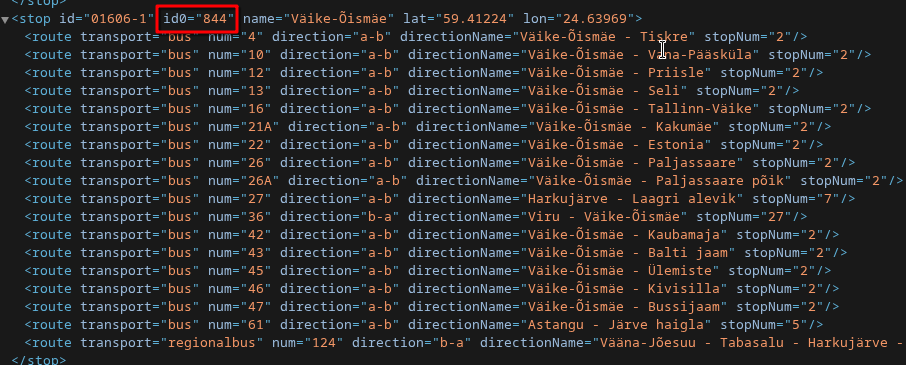
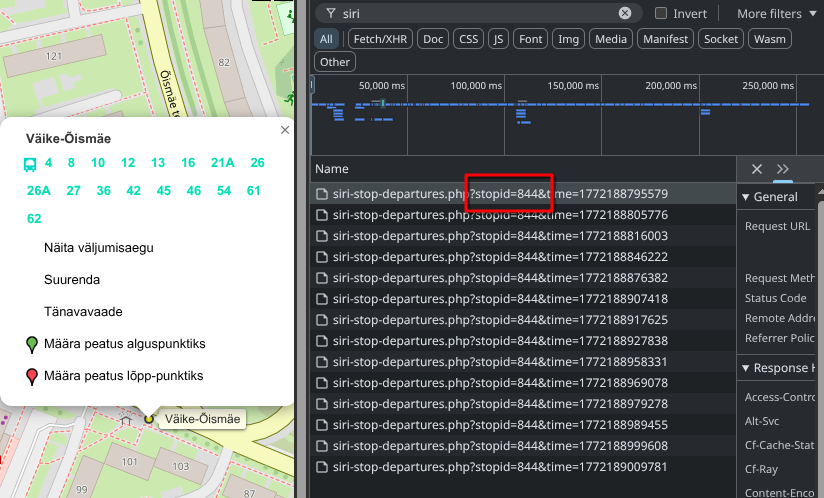
There are two ways to find the stop that you need. The examples show how to find stop ID for Väike-Õismäe, which would be ID value 844.
- Using stops data from open data portal: https://andmed.eesti.ee/datasets/tallinna-uhistranspordi-peatused-ja-marsruudid
Direct link to file containing names and IDs: https://transport.tallinn.ee/data/stops.xml
You can differentiate between the directions and find the correct stop id by looking at the line numbers and their direction of travel.
- Go to transport.tallinn.ee and open the developer tools (shortcut key F12) in your browser. Then open up the Network tab. Then either click on a bus stop on the map, followed by clicking to show the departure times; or pick a bus from the timetable and click the bus stop name. Look for “siri-stop-departures”, that will contain the
stopid= parameter.
Step 2: Download the data file
The code to download files is written for you. We use a demo code from libcurl library documentation, wrapped around some safety features so your program wouldn’t overload the server if you accidentally attempt to bombard them with download requests.
Call the function DownloadFileToDisk() to download the file to disk. The function is documented in file_helper.h and implemented in file_helper.c . See header for instructions on how to use it. First parameter requires you to compose the URL with the stopid value. The URL should be defined in main.h . Notice, that the function can either download the file as-is (CSV) or convert it to space delimited file automatically.
Now compile the program with all three source code files and run it. You will need to use -lcurl flag to link the libcurl library (i.e. gcc -o transport_app file1.c file2.c file3.c -g -Wall -Wextra -Wconversion -lcurl ), that downloads the file. Manually check that the file was downloaded to the disk (same directory as the program) and the data is intact.
Step 3: Read the file to memory
The data from the file needs to be read into a struct array. Start by defining the struct to store the relevant fields. There is no reason to store every field from the file – some of them are unnecessary. Only store the ones that are relevant for the task.
Write the struct declarations into data_processor.h . This file will also contain all the prototypes for functions in data_processor.c . Function to read the data from the file should go into the code file. You may add some helper functions to pre-process the data.
Reading the data file is a bit more complex than usual, because it contains 2 rows of header data, followed by the bus departures. It’s recommended to print the data on the screen while reading to double-check that everything works before proceeding.
Hint 1: The first two lines in the file contain a header, that needs to be handled before the reading loop begins. The first line includes the timestamp, which is needed to show how much time is remaining until departure. Use this as your current time for calculations. It won’t be completely accurate, but close enough. To get the time from a space delimited file, you can use the following reading statement
|
1 |
int ret = fscanf(fp, "%*s %*s %*s %*s %d %*[^\n]\n", currentTime); |
Make sure to test the return value to check if it was read correctly.
Hint 2: The second line in the file is irrelevant to the task (it confirms the stopid value). You can throw it away using similar concepts that we’ve covered before, i.e.: fscanf(fp, "%*[^\n]\n");
Now continue with a reading loop that is familiar to you from all the previous labs this semester. You are recommended to throw away the items you do not need using %*s format specifier (like presented in the currentTime reading example).
Step 4: Printing the timetable
Start by printing the timetable one time. After printing, the program should close normally. Create a function that will be passed the current time and your struct with the outbound transportation timetable. It could be something like
|
1 |
void PrintTimetable(struct BusStopData *data, int n, int currentTime) |
Print all the line numbers, destinations, expected time and time until expected time. Make sure that the formatting is clear.
Hint 1: There are two times in the file – ExpectedTimeInSeconds and ScheduleTimeInSeconds. Use the time that is estimated by the vehicles GPS position for showing the departure time and time until departure.
Hint 2: Since you need to print the time in minutes, hours and seconds, but it’s given as seconds from midnight. You can use the following helper function to simplify your code.
|
1 2 3 4 5 6 |
struct Time SplitTimeFromSecToStruct(int timeInSec) { return (struct Time){.hour = timeInSec / SEC_IN_MIN / MINS_IN_HOUR, .min = timeInSec / SEC_IN_MIN % MINS_IN_HOUR, .sec = timeInSec % SEC_IN_MIN}; } |
To use this, you need the following added to the header file
|
1 2 3 4 5 6 7 8 9 |
#define MINS_IN_HOUR 60 #define SEC_IN_MIN 60 struct Time { int hour; int min; int sec; }; |
Gotcha moment: UTF-8 destinations
You may notice that some destination names contain characters not present in ASCII table – e.g. Väike-Õismäe, Mustamäe, Männiku. If you want to format the output string using format specifiers like %20s , the 20 is for bytes, not printable characters. The output will not align correctly.
NB! This is out of the scope for the task!
Step 5: Update the timetable
The timetable needs to be printed once per second to update the departure times and clocl. For delay, you need to use the sleep() function from unistd.h .
Secondly you need to clear the screen between printing the output. For this, ANSI escape sequence is used. This is more portable and preferred over the system() calls, which you can often find on the internet. The sequence contains commands to clear the screen ( [2J ) and move the cursor to the top left ( [1;1H ).
|
1 2 3 4 5 6 7 8 9 10 11 12 13 14 15 16 17 |
while (1) { // ANSI escape sequences to clear the terminal printf("\033[2J\033[1;1H"); // TODO: Print header and the current time printf(); // TODO: Print the timetable PrintTimeTable(); // TODO: Update current time by 1 second // Next update in 1 second sleep(1); } |
Hints: The current time from the downloaded file is given in seconds from midnight. If you increment this variable by 1 each time the loop runs, you can pass it to PrintTimeTable() . This way the only thing you need to do to print the time remaining is subtract the expected departure time from current time. This variable should also be used to print the current time.
NB! The program runs in an infinite loop! Exiting gracefully is out of the scope for this task. Use ctrl+c to terminate the program.
Testing
To test, first use the Raja stop. This is also easy to validate because you can look out the window and see if the bus actually arrived when your program said it will.
Testing corner cases is hard, because you are using live traffic information and edge cases may not always come up.
Use a more popular bus stop to test for edge cases. In this case I used Taksopark (id 1135). In this you can see
- Delays
- Time left only in seconds
- Bus that has departed is being removed from the list
- Some may contain non-ASCII characters – i.e. Männiku, Tallinn-Väike
- Line numbers that include letters
Note that there are still untested cases left
- Stops that have trams or trolleys (trolleys available for 2027 version of course)
- How the time left is handled for buses that come after midnight, when the time is still before midnight
- When no buses are coming
MS Windows
This task is also solvable in MS Windows, however it is a bit more tedious, requiring a few additional steps. These steps have been tested in the spring of 2022! This assumes you installed the 64-bit version of the MinGW (e.g. through chocolatey – as given in the simple installation guide for MS Windows, using the command line). The steps are given as a transcript of the conversion from last year and are provided as-is!
1. Install libcurl on Windows. Uses chocolatey package manager
choco install curl
2. Make the library (dll file) available to the compiled program. Copy libcurl-x64.dll from libcurl installation directory to your program directory (assumes 64-bit compiler).
3. You need to download CA certificate so cURL can verify the certificate on the opendata website https://curl.se/ca/cacert.pem.
4. You need to specify the certificate authority file location to the code. Add this to the setup of the download in the file_helper.c, replacing the path\\to\\file with the path to the downloaded .pem file.
curl_easy_setopt(curl_handle, CURLOPT_CAINFO, "path\\to\\file");
5. You need to rewrite the check if a file is already downloaded because that uses POSIX library available on UNIX systems – unistd.h. You should rewrite it with windows solution of that. Haven’t tested, but you’ll likely find the function BOOL FileExists(LPCTSTR szPath) in the library io.h. You may need to add additional Windows-specific libraries.
6. You can only download as CSV with the code provided. To download space delimited, you need to rewrite the ReplaceChars function. Easy option would be to open up a second file pointer for writing to a different file and remove the fseek, Simplest would be to do getchar -> putchar with a check in between for commas to be replaced with spaces.
7. You need to add -I and -L flags to your compiler command line arguments. Mine were:
-I C:\ProgramData\chocolatey\lib\curl\tools\curl-7.81.0-win64-mingw\include\ -L C:\ProgramData\chocolatey\lib\curl\tools\curl-7.81.0-win64-mingw\lib\
Extra task 1 [W5-03]: Sorting using multiple criteria
For this task, you must have menu option 5 completed.
- Implement the qsort comparison functions to compare the structure array members based on their last name. If the last names are the same, you must use first name as a secondary criteria.
- Call the qsort and print functions accordingly
Testing
The following only contains the output of the extra task.
|
1 2 3 4 5 6 7 8 9 10 11 12 13 14 15 16 17 18 19 20 21 22 23 24 25 26 27 28 29 30 |
risto@risto-wk-tux:~/pr2/lab/wk5_div/t1_qsort/solution$ ./qsort Select your action! 1. Sort and display integer array (intArr) 2. Sort and display float array (floatArr) 3. Sort and display structures ordered by employment length 4. Sort and display structures ordered first name 5. Sort and display structures ordered by last and first. 0. Exit > 5 Employees sorted by employee last and first name: Anneli Oja 7.30 0 Andres Rebane 22.50 10 Doris Rebane 10.20 3 Mark Rebane 10.30 5 Sirje Vakra 15.40 0 Select your action! 1. Sort and display integer array (intArr) 2. Sort and display float array (floatArr) 3. Sort and display structures ordered by employment length 4. Sort and display structures ordered first name 5. Sort and display structures ordered by last and first. 0. Exit > 0 risto@risto-wk-tux:~/Nextcloud/work/ttu/teaching/_generic/prog2/lab/wk5_div/t1_qsort/solution$ |
Extra task 2 [W05-4]: Closest vehicles
For this extra task, you need to download the GPS positions of all vehicles in Tallinn and parse the data.
Requirements
- Download the live GPS data periodically.
Updating the data once every 5 .. 10 seconds is recommended.
Note that the timeout set in the downloader is set to 15 seconds, you need to update this. - Find the GPS coordinates of the ICT building
- Calculate the distance for all vehicles from the ICT building
- Order them by distance, show the 15 closest public transport vehicles.
- Update the output periodically.
- Limit the departures from the bus stop for base tasks so that both outputs would fit on the screen
Data
You can find the vehicle locations file by using either developer tools or from Estonian Open Data portal: https://andmed.eesti.ee/datasets/uhistranspordivahendite-asukohad-reaalajas
The portal also contains definitions for the data.
Testing
Notice here that the bus timetable updates the longitude and latitude regularly (every 5 seconds or so), as well as distance from ICT. This only applies to some buses, since others may be in the depo, waiting to depart.
Hints
- There are multiple formulas to calculate the distance between two points on Earth. Haversine is not the best accuracy, but it’s simple to implement and fast to calculate.
- You can create a counter that updates (ticks up) once a second that can be used to trigger the download after a set amount of time.
- You can use the same idea to update the outbound vehicles if you want to make a long-running program
After the class
- Be able to separate your program between multiple (.c) code files and compile them into a program.
- Understand the basics of function pointers
- Know how to use the qsort function
- Be able to pass a function pointer to a function as a parameter (e.g. for qsort)
- Understand the requirements for the qsort comparison function and be able to write such comparison functions for simple arrays and structure arrays.
- Know the general steps required to use third party libraries with your programs and be able to compile a program with them.
Additional materials
- Sorting algorithms visualized
https://www.toptal.com/developers/sorting-algorithms - Big-O cheat sheet
https://www.bigocheatsheet.com - Quicksort algorithm
https://en.wikipedia.org/wiki/Quicksort - Example structure
https://github.com/JackWetherell/c-project-structure - List of common C libraries
https://github.com/oz123/awesome-c