Basics
Loops are one of the most basic fundamentals in programming, that allow us to repeat a certain block of code or simply put, some statements in the code. This repeatable block of code is called the loop body. In C, we commonly surround the loop body in curly braces { } .
Loops are executed until the condition set for the loop holds true. The way we form those conditions is crucial to make sure that the loop executes as intended, thus making our programs work as expected.
Loops are generally divided into entry-controlled and exit-controlled loops. The control type defines when the loop condition is checked, meaning when the decision is made whether to execute the loop body or not.
Most programming languages support a similar set of loops. C supports while , do ... while and for loops. C does not support for earch type loops, that are widely used in some languages.
Each type of loop has certain scenarios where they are preferable over others due to convenience and clarity. This does not mean, that the same cannot be achieved with a different type of loop.
While loop
This is the most basic and common loop type available. while loops are entry-controlled – the loop body only executes if the loop condition holds true.
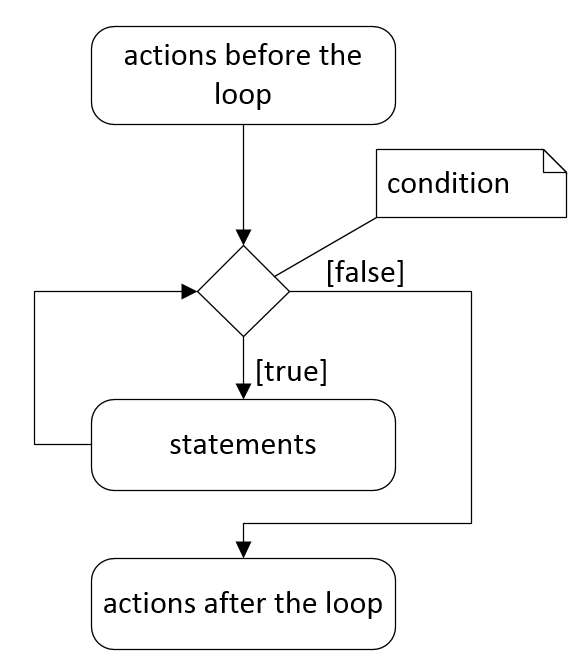
The only mandatory component of a while loop structure is its condition – it controls if the loop body will be executed. It is checked on each iteration before executing the loop body.
|
1 2 3 4 |
while (condition) { // loop body } |
while loops are commonly used when the number of repetitions is not known at the time of writing the code. This includes scenarios where the loop will never execute or will execute infinitely.
Example: display all powers of 3 below the limit value.
|
1 2 3 4 5 6 7 8 9 10 11 12 13 14 15 16 |
// Set up the calculator int multiplier = 3; int product = 1; int limit = 2500; printf("Powers of %d under %d are\n", multiplier, limit); // Calculate the powers while (product < limit) { // Print the current power printf("%d", product); // Calculate the next power product = product * multiplier; } |
For loop
for loop is another type of loop that is entry-controlled, thus allowing for the possibility of never executing the loop body. for loops are most often used when when the number of repetitions is known beforehand.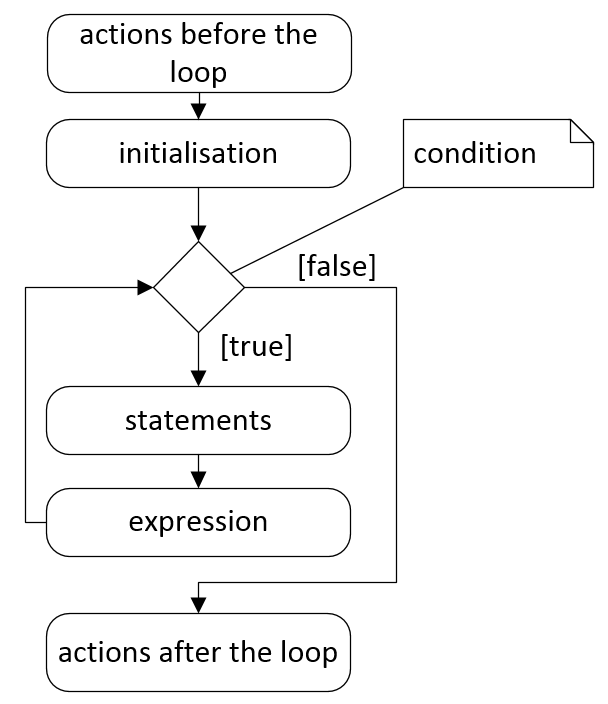
The structure of the loop has dedicated spots for initialization, condition and expression, separated by semicolons. This allows for clear and convenient use of counters. Make note of the location where each component of the loop is executed!
|
1 2 3 4 |
for (initialization; condition; expression) { // loop body } |
Example: The following loop will count from 0 to 9. Note that this is in the style of C90. Check below for difference between C90 and C99 (and later) style of writing.
|
1 2 3 4 5 6 |
int i; for (i = 0; i < 10; i++) { printf("i is %d\n", i); } |
for loop declarations in C90 vs C99 standard
ISO C90 forbids mixed variable declarations and code – all variables must be declared at the top of the function before any other code statements.
This forces you to declare loop iterators before the loop
|
1 2 3 4 5 6 |
int i; for (i = 0; i < 10; i++) { printf("i is %d\n", i); } |
Starting from C99 standard, you are allowed to declare the loop iterator right inside of the loop, making the code look a little cleaner.
|
1 2 3 4 |
for (int i = 0; i < 10; i++) { printf("i is %d\n", i); } |
Key takeaways
- For this subject, you can use both C90 and C99 style declarations.
- For some old embedded hardware, only C90 compilers will be available, forbidding variable declarations in the loop. This will cause a mixed variable declarations and code compilation error.
- When declaring in the C99 style, the loop iterator will be scoped to the inside of the loop only – in the example above, you cannot access the variable i outside of the loop!
- If you need the value of the loop iterator outside of the loop, you need to declare in the appropriate scope, outside of the loop.
Do … while loop
do ... while loop is the only loop in C that is exit-controlled, meaning that the body of this loop will always execute at least once, regardless of the condition.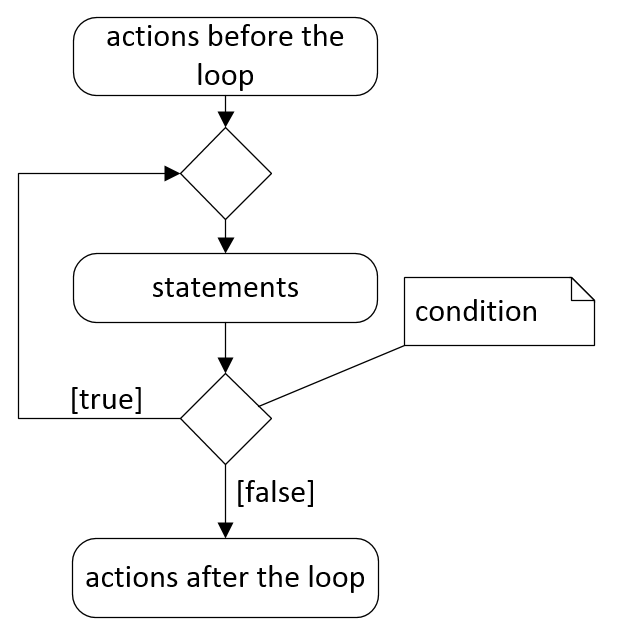
|
1 2 3 4 5 |
do { // Loop body } while (condition); |
This makes it convenient for tasks that need to be completed, but may need to repeat if some validation fails. An example of this would be user input, that needs to be validated before proceeding (e.g. user needs to enter a positive integer).
Example: The following loop repeats until the user enters . Notice that while userInp is left uninitialized, it’s not a problem for the loop. This is because the loop condition is checked after the user needs to enter a value for the variable.
|
1 2 3 4 5 6 7 |
int userInp; do { printf("Enter 0 to exit!\n"); scanf("%d", &userInp) } while (userInp != 0); |
Infinite loops
Infinite loops are most commonly used when programming for embedded systems – they need to repeat the same action(s) infinitely over their lifetime. While again, any loop can be written as an infinite loop, the most clear way to do it is using the while loop with a condition of 1 . Any non-zero value will be evaluated as true in C. Typically you want to avoid using other types of loops when writing infinite loops!
|
1 2 3 4 5 |
// Infinite loop while (1) { // Loop body } |
Sometimes you will also see infinite loops that allow for exit under certain condition. For this, a conditional statement is used to detect the appropriate condition and a break statement to stop the execution of the loop. Break statement is explained in further detail in the paragraph about Control Statements.
|
1 2 3 4 5 6 7 8 9 10 11 |
// Infinite loop while (1) { // Loop body // Stop the loop if (exit-condition) { break; } } |
Nested loops
Nested loops is the practice of putting one loop inside of another loop. there is no technical limit on how many loops can be nested inside of each other, but there are practical limits where the code will become unmaintainable. To avoid this, you should avoid nesting more than two loops. If you require to nest more loops, you should restructure the code into more functions.
There are also no requirements or limitations which types of loops can be nested, e.g. you can put a while loop inside of a for loop.
In the following example, two for loops are nested in the C99 style.
|
1 2 3 4 5 6 7 8 9 10 11 12 13 14 15 16 17 |
#include <stdio.h> int main(void) { int n = 5; int m = 7; for (int i = 0; i < n; i++) { printf("Start of the outer loop iteration i = %d\n", i); for (int j = 0; j < m; j++) { printf("i = %d; j = %d\n", i, j); } printf("End of the outer loop iteration i = %d\n\n", i); } } |
Note, that the outer loop contains the two print statements and a for loop. Both printf statements and the for loop are executed n times.
The inner loop uses a different counter j . The contents of the inner loop is executed m times. This causes the inner loop to be executed a total of n * m times.
Be careful on getting the conditions and counters correct when nesting loops! It’s very easy to mix up i and j and cause a loop to never execute or run infinitely.
Control statements
Loop control flow can be manipulated by using control statements such as the break and continue statement. Both of these statements are considered jump statements, because they change what code is going to be executed next, i.e. alter the program control flow.
Break statement
Break is used to break out of a loop. This can either be used to terminate a loop early or allow exiting from infinite loops. The following example shows how to break out of an infinite loop.
|
1 2 3 4 5 6 7 8 9 10 11 12 13 14 15 16 17 18 19 20 |
#include <stdio.h> int main(void) { int num; while (1) { printf("Enter a positive integer: "); scanf("%d", &num); if (num > 0) { break; } } printf("Integer %d is accepted\n", num); return 0; } |
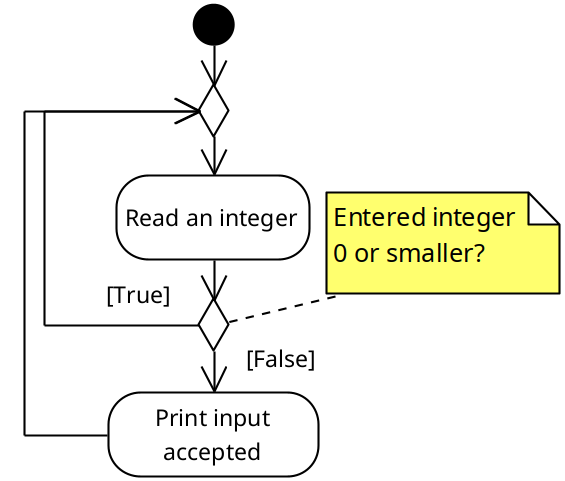
Break statements are modeled as control flow – i.e. the path the program takes changes. Break statements should not be modeled as actions!
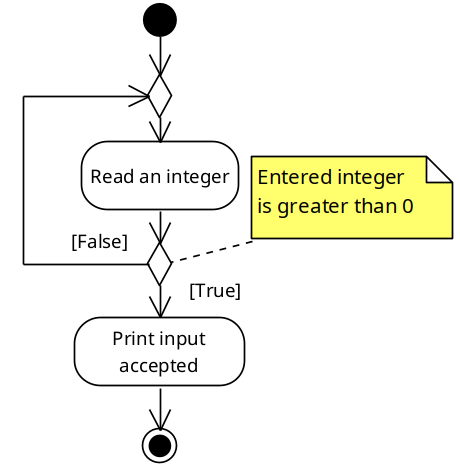
Notice, that the model is identical to the control flow of a do .. while loop. The same code with identical functionality can be written as a do .. while loop and in this case, it would also look cleaner.
Keep in mind, that when working with nested loops, it will only break out of the loop that it is called within.
You will also find break statements used to break out of switch statements.
Continue statement
Continue statement is used to skip the remaining code statements in a loop body. Just as with a break statement, it will only affect the loop it is called within. If loops are nested, it will not affect the outer loops.
When used inside a while or a do .. while loop, it will jump straight to checking the loop condition. When inside a for loop, it jumps to the loop expression (e.g. i++ ), that will be followed by checking the loop condition on the next iteration.
In the following example, when user enters a negative integer or 0, the last print statement is skipped. Note that this is an infinite loop with no exit condition to keep the example short. To terminate the program, use ctrl+c .
|
1 2 3 4 5 6 7 8 9 10 11 12 13 14 15 16 17 18 19 20 |
#include <stdio.h> int main(void) { while (1) { printf("Enter a positive integer: "); int num; scanf("%d", &num); if (num <= 0) { continue; } printf("Integer %d is accepted!\n", num); } return 0; } |
When modeled, you can see that continue statement jumps straight back to the beginning of the while loop. However since it’s an infinite loop, it doesn’t have a loop condition that would allow for exiting the loop.
Loops with no body
In C, a semicolon denotes the end of a statement. A semicolon can be written after the for or while loop header line, indicating, that the loop has no body. This can either be done on purpose, but it is also a very common mistake for beginner programmers.
As an exception, do ... while loops require a semicolon after the loop condition. This section does not apply to do ... while loops.
No body as a common coding mistake
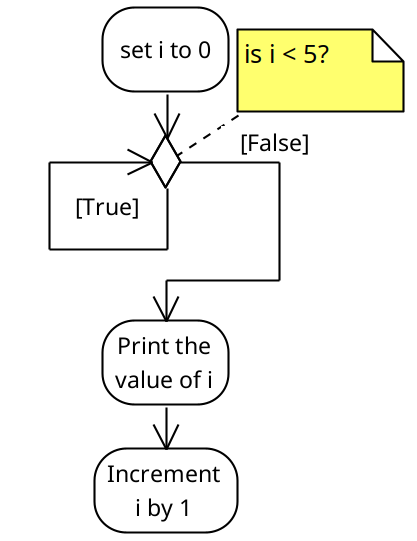
When writing while loops, adding a semicolon after the condition will typically cause an unwanted infinite loop. In the example below, the loop iterator i will infinitely equal to , as the increment operation i++ is not a part of the loop body. While it is in the code block indicated by the curly braces, this block is not the body of the loop, but rather what comes after the loop.
|
1 2 3 4 5 6 7 8 9 |
int i = 0; // Mistake here causes an infinite loop while (i < 5); { // This IS NOT the loop body due to the semicolon! printf("i = %d\n", i); i++; } |
When modeled as an activity diagram, the mistake becomes a lot more obvious.
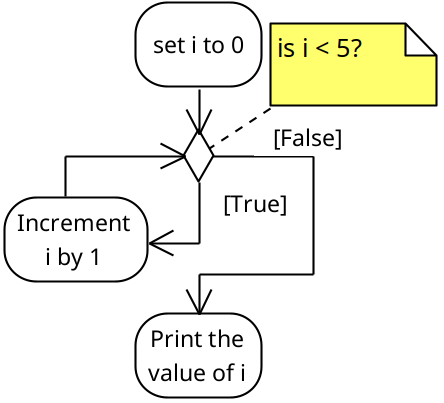
In the following example, the loop will execute 5 times, which is as expected. However the only statement in the loop body is the increment i++ . This means that the loop will be terminated as expected, compared to a similarly written while loop. However there will be no printout in the loop, as that statement is not within the loop body. The print statement is located in the code block after the loop and thus will be executed once.
|
1 2 3 4 5 6 7 8 |
int i = 0; // Mistake here will cause the loop to run "invisible" to the programmer for (i = 0; i < 5; i++); { // This IS NOT the loop body due to the semicolon! printf("i = %d\n", i); } |
The behavior becomes much clearer again when visualized as an UML activity diagram.
No body as deliberate code
In some cases, programmers try to shorten their LOC (lines of code) by writing loops on a single line. This can be done for both while and for loops. This is typically considered in bad taste. The issue is that this kind of code is thought to be deliberately hiding intent (i.e. malicious code such as viruses). This will also cause issues with code review and debugging!
|
1 2 3 4 5 6 7 8 |
char str[] = "What a wonderful day!"; int i = 0; // Loop to the character past the space while (str[i++] != ' '); printf("The string from the second word: %s\n", &str[i]); |
While you should be aware of this, avoid writing code like this. Write the loop out in full, so that it’s easy to debug and maintain.
Note that this code will also crash the program if the string doesn’t contain a space – so we also created a hidden bug!