For homework 2, you need to create a software solution to solve a problem given to you in your variant, based on the requirements. The solution must be properly documented.
The focus of this homework is mode thorough identification and analysis of erroneous situations, with proposing and implementing solutions to guard against it. For technical aspects of programming, the focus is on using arrays, decomposition of the code into functions and solving erroneous situations.
When testing the program, you must
- Test using stream redirection according to the given input samples
- Make sure that all outputs from the program are clearly understandable, in case the program is executed normally and the user is expected to enter input from the keyboard according to the prompts given by the program.
Documentation
For this homework, you need to present a thorough report. Quality of the report is a part of the final grade.
The report must adhere to IT faculty’s thesis guidelines. Most faculties use the same or similar principles with minor alterations. We are providing you a shortened (non-complete) version of this guide provided, that you should follow: https://blue.pri.ee/ttu/resources/report-guidelines/
Use the same templates as you used with Homework 1 (https://blue.pri.ee/ttu/programming-i/homework-i/) and adjust it to fit the requirements of this homework.
Documentation
- Title page
- Declaration of originality
- List of abbreviations and terms (can be omitted, if none exist)
- Table of contents
- List of figures and tables (can be omitted, if none exist)
- Task description and your variant
- Description of the solution
- Written text should be 2 .. 4 A4 pages long, not including any figures you add to it. Description must be well structured.
- What is the purpose of Your program? What does it do?
- Explain the program’s input (where does the input come from, in which format must it be in, in which order are inputs expected and if there are any limitations to input values).
- Program flow (in which order are things done, be brief and generic, present as a list)
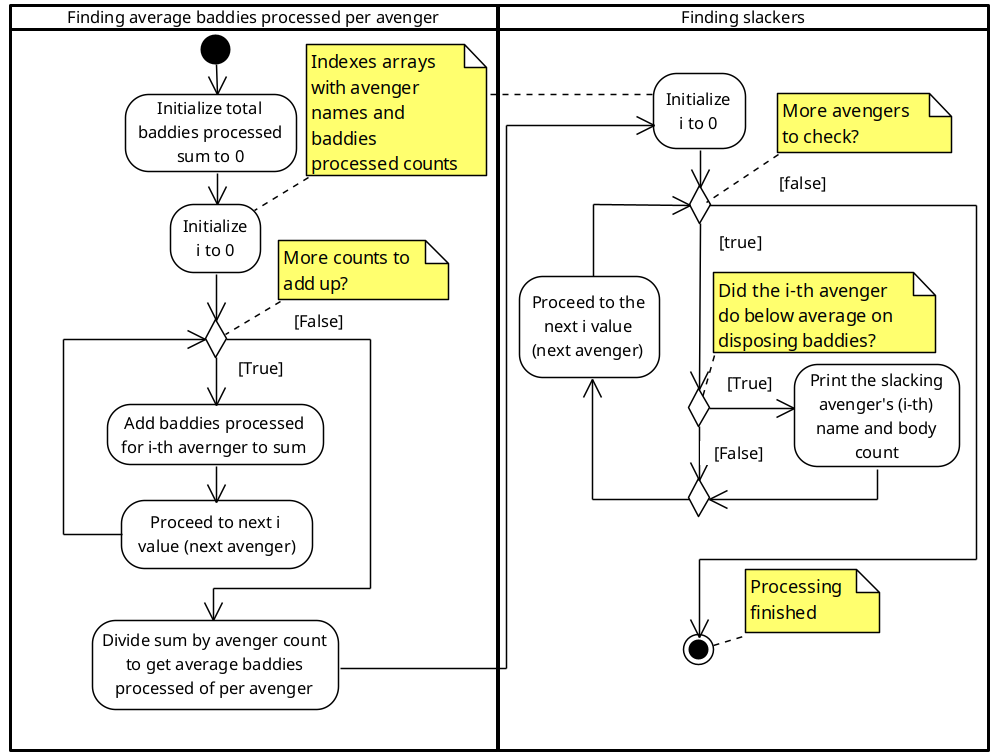
- Algorithm modeled as UML acitivity diagram. Only show the steps needed to process the data and achieve the result. Do not show reading of inputs or anything from the extra task requirements. Look at the example in the third tab.
- Special situation analysis and handling (simplified risk analyis) , presented as a table
- Analyze various situations (e.g. inputs) that can cause errors or issues for your program
- Propose a solution for each of the issues (if possible). You can also compare multiple alternative solutions.
- Specify the state of this issue – e.g. you can use statuses such as identified, solution proposed, accepted, mitigated.
- NB! You should also list issues that you are unable to solve with your current knowledge (or experience), but you are aware of. This would set the status for the issue as identified.
- Summary
- A few sentences about your approach to the task and work processes.
- A few sentences about the task itself and the complexity of it
- If possible, give an estimate on the workload
- Would you recommend reusing the task? Would you change anything about it, and if so, what?
- Additional comments, emotions, thoughts
- References (can be omitted, if none exist)
- Use IEEE style for references
English official reference: https://journals.ieeeauthorcenter.ieee.org/wp-content/uploads/sites/7/IEEE_Reference_Guide.pdf
Reference help by TalTech (in Estonian): https://haldus.taltech.ee/sites/default/files/2024-05/IEEE_stiilis_viitamine_2024%20%281%29.pdf - Everything that wasn’t covered by the subject and that you didn’t create yourself
- This includes help from a friend or a colleague: https://libraryguides.vu.edu.au/ieeereferencing/personalcommunication
- Use of AI tools must be in accordance with the rules specified by the university according to official documentation provided on the TalTech webpage
- All references must be directly to the material used. Generic references such as wikipedia.org, stackoverflow.com or google.com are meaningless
- Use IEEE style for references
- Appendix: Screen capture(s) of the working program
- You must show your program running through stream redirection.
- Screen captures should illustrate various situations that you program can handle, as well as the normal behavior.
- Screenshots can be added as an appendix or embedded within the write up of the solution – in this case you can extend the length by the amount of figures.
Note: If you used concepts and techniques that were not covered in the programming course by the time of writing this homework, you must explain the principles and benefits the code. You are allowed to go beyond the limits when describing this.
Requirements for input
The program you create can be used in two different ways
- Through stream redirection. This will affect the requirements for the order of inputs that your program must accept. More information about this under “input file structure”.
- Executing the program normally, waiting for prompts and writing inputs on the keyboard. This requires the input prompts for the user to be clear and feedback must be provided for erroneous inputs.
Your program needs to work with data sets where the length of the array dimensions are up to 15. This means that for 1-dimensional arrays, you may have 15 values and for 2-dimensional arrays you may have 15 x 15 values. Your task variant may include multiple arrays.
You are provided with two text files alongside your task variant, that contain the sample inputs. These will also be your first two input files that you must test with. Your program needs to read the inputs in the same order as they are specified in the files. Data types should be picked according to the values in the sample input files. It is expected that you create additional test files to show handling of erroneous inputs. These will be submitted for grading alongside your solution.
Part of your task will be to analyze and solve various situations that your program may come across. E.g. what happens, if the user wants to enter only 1 input? -55 inputs? 100 inputs? The program you create must be able to handle problematic inputs. At minimum, it must gracefully handle inputs that are outside of the expected range, within the data type that is expected. The analysis in the documentation must also account for a wider array of inputs, but solving them in code is only expected when you submit the solution with the extra task.
Input file structure
The first number in the input file will always describe the number of array members following it. If it’s a matrix, two numbers will precede the data. If the program also has other inputs, they will be listed after the last array member.
E.g. an input file for finding the average grade: 9 1 0 4 5 5 3 5 4 2
The first number 9 indicates how many grades will follow, after which there will be 9 grades.
Requirements for the standards and environment
The program must be written in the C programming language. You are permitted to use the C90 and C99 standards. Using newer standards (C11, C17, C23) is permitted, if it provides additional value. This must be explained in the report.
In addition to the standard C libraries, you are allowed to use C POSIX and GNU C libraries and extensions. Any other libraries must be agreed upon separately.
Your program will be compiled and tested in a Linux environment, equivalent to the one in the lab computers (OpenSUSE SLED-15 SP5, using GCC-12) or the recommendation for home setup (Ubuntu Linux 24.04, using GCC-13 compiler or later). Compatibility with Windows or MacOS is not required.
Program requirements
Your code must adhere to the practices covered so far. In addition, the following requirements must be met
- There are no goto statements, global variables in your code
- Your program must read the input from stdin standard stream. Your program will be tested both by running it with stream redirection and directly typing the inputs on the keyboard.
- Must not contain any unused components – e.g. libraries, variables, ..
- Code is divided into functions
- Compose your functions based on the practices learned and follow the coding style requirements
- No function should include spaghetti code – this also includes main() function
- main() function must be the first function in your code file. All user defined functions should be after the main function
- You can also use a header file if you wish
- Code must adhere to the coding style, including (but not limited to):
- Coding style is uniform throughout the file(s)
- All code files have an appropriate header with the name of the author, date, short description
- The code is commented
- All names (variables, functions, macros, ..) are self-explanatory
- The code is indented, lines are within the maximum allowed length and spaces are put where required.
- No magical numbers
Extra task for bonus points
It is possible to earn up to 15 bonus points from the task. In order to get any points, you must include the added features to the report. It is possible to obtain partial bonus points if not all requirements are met.
To get bonus points, the following requirements must also be met in addition to the base requirements
- The application must support the following command line arguments
- -i=file_name and --input=file_name – Program reads the input from the given file and prints the results immediately.
- -p=interactive and --prompt=interactive – Program reads input from stdin standard stream. The program must clearly express what it requires from the user and print error messages as they happen. This is the default option.
- -p=disabled and --prompt=disabled – Program reads input from stdin standard stream. The program must not present the user with any prompts for input. Only the results are displayed.
- --help – Prints a guide how to use the program using the classical help page structure and style (Some examples: grep --help and man grep )
- The program must not break down if the user enters a string instead of an integer.
- Program reads input from stdin standard stream.
- You must add a level 1 heading to the documentation called “Extra task”.
- Describe the added features
- Describe how you approached adding and checking the command line arguments
- Describe how you decided what was important to be displayed on the help age
- Explain your approach to input validation so that the program wouldn’t break on invalid input.
Deadlines, points and bonuses
A complete homework must be submitted no later than 14.12.2025 23:59:59 (local time)
Each day passed the homework deadline will deduct 1 point from the final homework score. The late penalty is capped at 50 points, meaning if you submit 60 days late, you will still lose 50 points..
If we have questions about the submitted homework or are not sure about the original author of this work, we will grade this with 0p. In this case, the work must be defended.
If it becomes necessary, we will enforce the rules and guidelines of [Procedure for processing a student’s violation of academic practices and contemptible behavior in the School of Information Technologies]
We will only accept Your homework until the lockdown date (check introduction slides). Past that, submitting your homework will not be possible.
Submitting Your work
You need to submit the documentation in Adobe PDF format, all the necessary code files to compile your program and a zip archive with the test inputs, which should include additional inputs created by you.
Naming schema: HW2_<studentcode>_<firstname>_<lastname>
Example:
HW2_Smith_123456MVEB_code.c
HW2_Smith_123456MVEB_report.pdf
HW2_Smith_123456MVEB_inputs.zip
Submitting is done using Moodle.
Result and feedback
After your work has been checked and graded, you will see the result and feedback on Moodle (visible from the course gradebook!). If everything was well done, feedback may be absent.
Fixing your homework
You are allowed to fix and improve your homework score until the date of homework lockdown. All fixed submissions are subject to defense.
To fix your homework, first go through your feedback. Then contact your teacher and agree upon the process of how this homework can be fixed.
NB! If fixing the homework changes more than half of the original homework, it is considered as submitting a completely new homework, from which minus points can be deducted from depending on the time of submission.
NB! This is only a partial example displaying some parts of the code structure, inputs, testing, algorithm and coding style. The submitted task must meet the complete requirements.
The algorithm expects you to show the steps required for data processing and achieving the requred results. Do not include reading or validating of inputs. You also don’t need to include anything from the extra task requirements (e.g. processing of command line arguments).
Examples of testing
Testimiseks kasutan mitut erinevat andmefaili katmaks erinevaid olukordi, millega rakendus on võimeline toime tulema
To test this, I’m going to use multiple test files to check if my conditions work as expected.
Test 1: Expected inputs, running with stream redirection
Test inputs
|
1 2 3 4 5 |
4 Hulk 19 Thor 4 Cpt.America 12 Hawkeye 6 |
|
1 2 3 4 5 6 7 8 9 10 11 12 |
risto@risto-wk-tux:~/git/IAX0583/HW2$ ./HW2_Heinsar_112233IASB < tests/test_1_valid_inp Enter avenger count between 1 and 10 Enter the name and disposed of count for avenger 1: Enter the name and disposed of count for avenger 2: Enter the name and disposed of count for avenger 3: Enter the name and disposed of count for avenger 4: Total number of avengers in mission was 4 Average baddies disposed of was: 10.25 The following avengers were slacking off: Thor 4 Hawkeye 6 |
Test 2: Test inputs outside of allowed range, running with stream redirection
Test inputs
|
1 2 3 4 5 6 7 8 9 |
19 0 -5 5 Falcon 2 Hulk 24 Thor 3 Cpt.America 5 Hawkeye 21 |
|
1 2 3 4 5 6 7 8 9 10 11 12 13 14 15 16 17 18 19 20 |
risto@risto-wk-tux:~/git/IAX0583/HW2$ ./HW2_Heinsar_112233IASB < tests/test_2_err_range Enter avenger count between 1 and 10 I'm sorry, I can't handle that :( Enter avenger count between 1 and 10 I'm sorry, I can't handle that :( Enter avenger count between 1 and 10 I'm sorry, I can't handle that :( Enter avenger count between 1 and 10 Enter the name and disposed of count for avenger 1: Enter the name and disposed of count for avenger 2: Enter the name and disposed of count for avenger 3: Enter the name and disposed of count for avenger 4: Enter the name and disposed of count for avenger 5: Total number of avengers in mission was 5 Average baddies disposed of was: 11 The following avengers were slacking off: Falcon 2 Thor 3 Cpt.America 5 |
Test 3: Inputs from the keyboard
This example does not include an input file, the input is directly written on the keyboard. The prompts and output of the program must be clear to the user.
|
1 2 3 4 5 6 7 8 9 10 11 12 13 14 15 |
risto@risto-wk-tux:~/git/IAX0583/HW2$ ./HW2_Heinsar_112233IASB Enter avenger count between 1 and 10 3 Enter the name and disposed of count for avenger 1: Hulk 15 Enter the name and disposed of count for avenger 2: Thor 30 Enter the name and disposed of count for avenger 3: Falcon 5 Total number of avengers in mission was 3 Average baddies disposed of was: 16.6667 The following avengers were slacking off: Hulk 15 Falcon 5 |